
How Social Media Managers Use Savetok for Strategy
Learn how social media managers use SaveTok to collect, organize, and analyze TikTok content for trend research, campaign planning, and content strategy.
Read Article →Download TikTok Videos Without Watermark - Fast, Free, No App Required
Savetok provide the most reliable and highest quality TikTok downloading tools on the web.
Download videos in their pure, original form without the TikTok logo or creator handle blocking the view using savetok.
Our advanced servers process videos instantly, giving you the direct MP4 download link in just seconds.
Works perfectly on iPhone, Android, PC, or Mac. No app installation or browser extensions required.
Save any TikTok video to your device in 3 simple steps.
Open the TikTok app on your phone or website on your computer. Find the video you want to download. Tap the Share button on the right side of the screen.
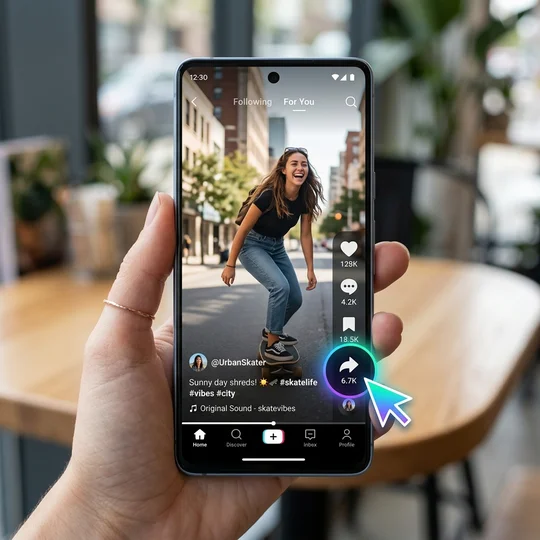
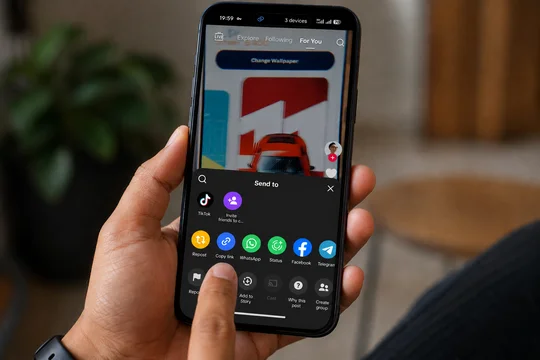
From the share menu, select Copy Link. The video URL is now saved to your device's clipboard.
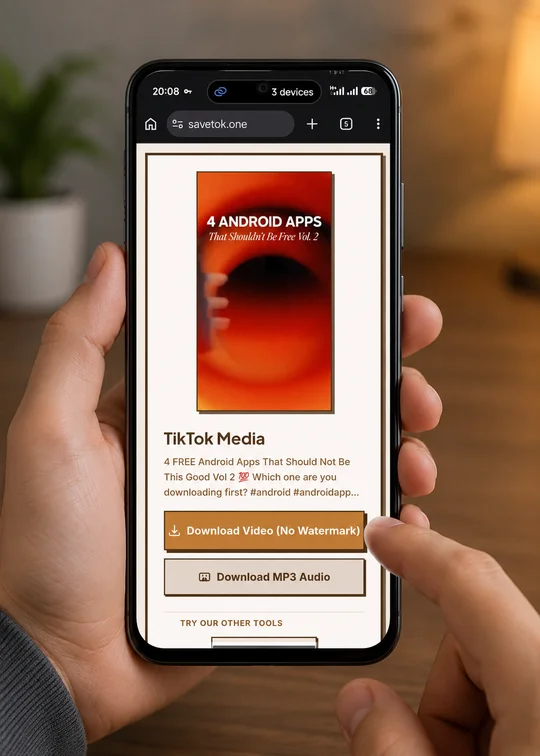
Come back to SaveTok.one, paste the link into the search box at the top of this page, and hit Download. Your video will be ready in seconds, watermark-free!
SaveTok.one is a new online tool that is specially designed to help you download TikTok videos without watermark quickly and in HD quality. Whether you are a content creator looking to repurpose your videos for Instagram Reels and YouTube Shorts, or simply someone who wants to save their favorite TikToks for offline viewing, our downloader provides the highest quality MP4 video files available.
Unlike other tools that compress the video or leave a blurry logo, SaveTok fetches the original HD video directly from TikTok's CDN. This ensures that the video you download is exactly the same crystal-clear quality as the one you watched on the app. Best of all, our service is entirely free, requires no user registration, and works flawlessly across all devices, including iPhone, iPad, Android smartphones, Windows PCs, and Macs.
Saving TikToks directly from the app often results in a bouncing watermark and a lower-resolution file. By using a dedicated TikTok video downloader like SaveTok, you bypass these limitations. You can build your own personal archive of funny memes, educational tutorials, cooking recipes, and trending dances without worrying about the creator deleting the video later.
In addition to saving videos, SaveTok also functions as a powerful audio extractor. If you discover a trending song, a funny voiceover, or a motivational speech on TikTok, you can easily use our MP3 Downloader tool to strip the audio track from the video and save it as a high-quality MP3 file to your device. This is perfect for setting custom ringtones or adding background music to your own projects.
Learn how social media managers use SaveTok to collect, organize, and analyze TikTok content for trend research, campaign planning, and content strategy.
Read Article →Looking for an SSSTik alternative to download TikTok videos without a watermark? Discover why SaveTok is the fastest, free, and HD downloader in 2026.
Read Article →Looking for a TikMate alternative to download TikTok videos without a watermark? Discover why SaveTok is the #1 choice for fast, free, and HD downloads in 2026.
Read Article →Yes! SaveTok is 100% free. There are no subscriptions, no hidden fees, and no account required.
Yes. SaveTok fetches the original, clean video file directly from TikTok's servers, so there is no watermark on the downloaded file.
Yes. Open Safari on your iPhone, paste the TikTok link into SaveTok, and tap the download button. The video will save to your Photos app.
SaveTok is safe. We do not ask for your TikTok login, we do not store your downloads, and we do not collect personal data.
Yes, our tool is 100% web-based. You don't need to install any third-party apps or software. Just use your Safari, Chrome, or Edge browser.
Absolutely. We don't require you to login to your TikTok account, we don't save copies of downloaded videos, and we don't track your search history. It is completely anonymous and secure.
If the original creator uploaded the video to TikTok with a watermark already embedded in the raw video file (e.g. from CapCut or another app), we cannot remove it. We only remove the official TikTok app watermark.